
One file per choice
Updated November 9, 2026
When each choice of a field needs its own file (a brochure per language, a price list per plan), One file per choice sets up all the rows for you.
- Click One file per choice.
- Pick the field. The list shows only sources with choices, including Payment Status.
- Click Add rows.
- In each new row, click Choose a file and pick that choice’s file.
- Click Update Notification.
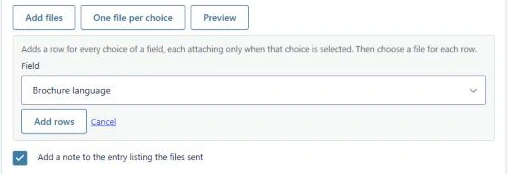
Each new row already has one rule, field is choice, and is added at the end of the list. You can then change anything in those rows like any other row.
Good to know
- Rows you don’t choose a file for are dropped when you save. Skip the choices that don’t need a file.
- The rows are a starting point, not a link to the field. If you add or rename choices later, add or change the rows yourself.
- Click Cancel to close the panel without adding rows.
Was this page helpful?
Thanks for letting us know.