
The Attachments (KodaClip) section
Updated November 9, 2026
Open a form’s Settings → Notifications, edit a notification and scroll to the bottom. The Attachments (KodaClip) section has these parts.
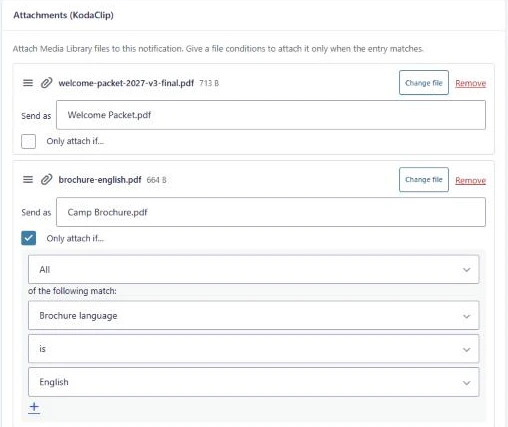
| Part | What it does |
|---|---|
| File rows | One row per file: the file name and size, Change file, Remove, Send as and Only attach if…. Drag the ☰ handle to reorder. |
| Add files | Opens the Media Library to add one or more files. See Adding and changing files. |
| One file per choice | Adds a row for every choice of a field, each with its condition already set. See One file per choice. |
| Preview | Shows which files an existing entry would get. See Preview. |
| Add a note to the entry listing the files sent | Adds a note to each entry saying which files were sent. On by default. See Entry notes. |
| Warnings | A yellow box appears when files are over 10 MB in total, when rows have no file yet, or when you pick a file that’s already listed. |
Nothing in this section is saved until you click Update Notification. If you leave the page first, your changes are lost.
If the section says KodaClip needs an active license, see Install and activate.
Was this page helpful?
Thanks for letting us know.