
Entry permissions
Updated November 9, 2026
Board Settings → General → Entry Permissions decides who can edit and delete entries from the board. It covers every way of changing an entry: the edit form, inline editing, action buttons, checklists, Kanban moves that change fields, and so on.
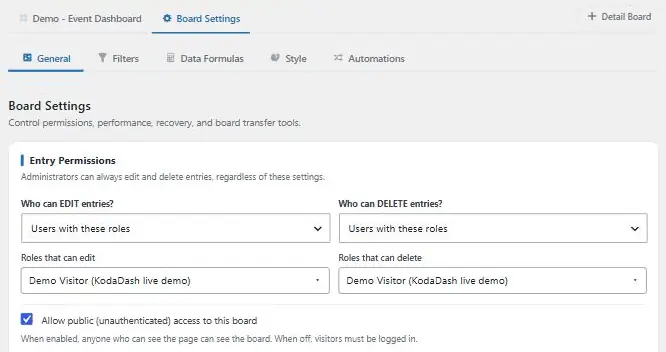
Administrators, and anyone else who can manage KodaDash boards, can always edit and delete entries, whatever these settings say.
Who can edit, and who can delete
Set Who can EDIT entries? and Who can DELETE entries? separately. Delete has one extra choice, Same as Edit permissions, which copies the Edit setting, rules and all.
| Choice | Who is allowed |
|---|---|
| Entry creator only | The logged-in person who submitted the entry. This is the default. |
| Any logged-in user | Everyone who is logged in. |
| Anyone with the link | Anyone who can see the board, logged in or not. Edit and delete links are signed, so they only work from the board itself. |
| Entry creator, or the owner of the Detail Board’s entry | The entry’s creator, plus, on a Detail Board, the person who created the entry the Detail Board shows. For example, a team leader can edit their team members’ entries listed under their own registration. |
| Users with these roles | Only people with the roles you pick. |
| Custom rules | People who match rules you write. See below. |
With every choice except Users with these roles, you can also pick roles under Also allow these roles. People with those roles are always allowed.
With Users with these roles and no roles picked, only administrators can edit or delete.
Custom rules
Custom rules let you decide per form, using the entry’s own fields and the visitor’s details. A visitor is allowed when any rule set matches.
- Also allow the entry’s creator: tick it to keep creators allowed on top of your rules.
- When the entry matches: rules checked against the entry being edited or deleted, for example “Team leader email” is “Current User Email”.
- When the Detail Board’s entry matches: for entries listed on a Detail Board (such as Related Entries), rules checked against the entry the Detail Board shows.
Rules can compare fields with visitor values such as Current User ID, Current User Email and Current User Role. See Filter conditions for the full list.
For entries listed under a Detail Board, KodaDash always checks on the server that the entry really belongs under that Detail Board’s entry, so changing a link can’t give someone access to other entries.
Seeing a board vs changing entries
These settings only control changing entries. Who can see the board is set by Allow public (unauthenticated) access to this board in the same tab, and by each block’s Visibility tab. Kanban and Calendar blocks also have their own permissions for things like moving cards and dragging events.
Thanks for letting us know.