
Build your first board
Updated November 9, 2026
This walk-through builds a simple board: a list of entries from one form. It takes about five minutes. Everything else in KodaDash builds on these same steps.
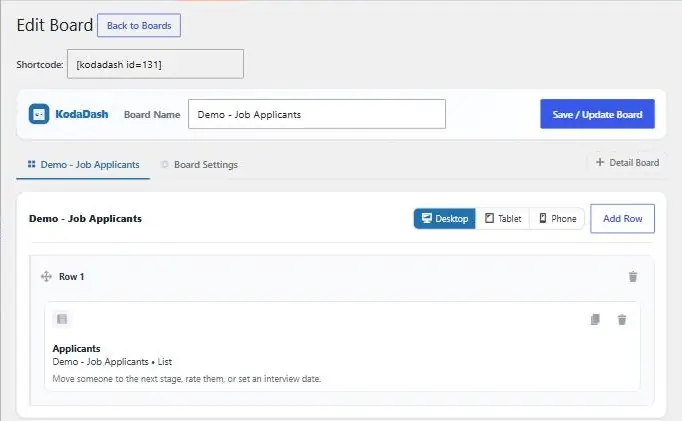
1. Create the board
- Go to KodaDash → Add New Board.
- Type a name in Board Name, for example “Job Applicants”. Visitors don’t see this name; it’s for you.
A new board starts with one empty row, Row 1, on the first tab. That tab is your main board, and it takes the board’s name once you save.
2. Add a block
- Under the board, the Add Block panel lists every block you can use.
- Drag List into Row 1 and drop it in the dashed area.
The block appears in the row as (Untitled) with “No form selected”, and the panel below switches to Edit Block.
3. Choose the form
- In Edit Block, open the Source tab.
- Pick the form in Form.
- Optional: choose how entries are sorted (Primary sort and Primary direction). Newest first is the default.
4. Choose the columns
- Open the Columns tab and click Add Column.
- Leave Type on Field and pick the form field to show. The Label is the column heading.
- Repeat for each column. Drag the handle on a column’s left to change the order.
The Block tab sets the block’s title and size, Style its colours and spacing, Filter which entries it shows, and Visibility who can see it. They are all covered on the List block’s own page.
5. Save
Click Save / Update Board. An orange Unsaved changes dot next to the button means something hasn’t been saved yet.
After the first save, the page title changes to Edit Board and a Shortcode box appears at the top, such as [kodadash id=131]. You use it to show the board on a page.
New boards are for logged-in visitors only. To let anyone see the board, open Board Settings → General and tick Allow public (unauthenticated) access to this board.
If your browser closes before you save, KodaDash keeps a copy of your unsaved changes and offers to restore them the next time you open the board.
Thanks for letting us know.