
How a Kanban works
Updated November 9, 2026
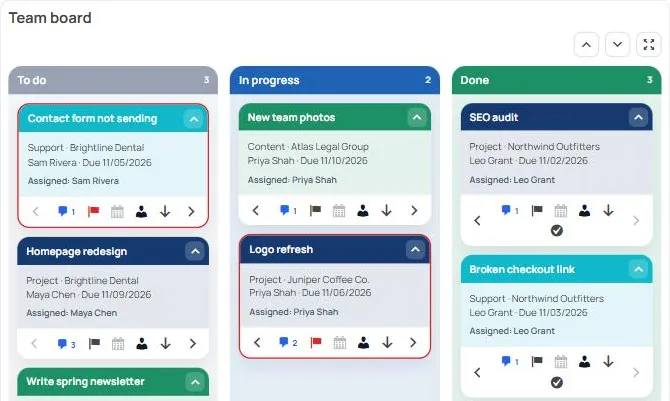
A Kanban shows form entries as cards in columns. Each card is one entry. Moving a card doesn’t change the entry unless you ask it to (see Keep cards in step with form fields).
Where an entry can be
| Place | What it means |
|---|---|
| Available Entries | Entries from the Kanban’s forms that aren’t on the board yet. New entries land here unless they are made with New card, or a synced field puts them in a column. |
| A column | The entry is a card on the board. |
| Ignored | Entries someone chose to leave off the board. They stay out of Available Entries. |
| Completed | Cards finished from the last column. |
Available Entries, Ignored and Completed are in the panel under the columns. Click Available Entries to open it, and tick Show Ignored or Show Completed to switch lists.
Good to know
- A card’s place, assignees, priority, due date and notes belong to that Kanban. The same entry can be on two Kanbans, in different columns.
- One Kanban can hold entries from several forms. Each form has its own card layout and colour.
- Every change to a card is logged on the card (see Card notes and @mentions).
- Administrators, and anyone with the KodaDash management capability, can always do everything on a Kanban. Everyone else needs the actions ticked in Kanban permissions.
Setting one up
- Add a Kanban block to your board.
- Choose its forms, and how due dates and assignees work: Forms, columns and due dates.
- Decide what each card shows: Card layout and colours.
- Say who can do what: Kanban permissions.
Was this page helpful?
Thanks for letting us know.