
The review step
Updated November 9, 2026
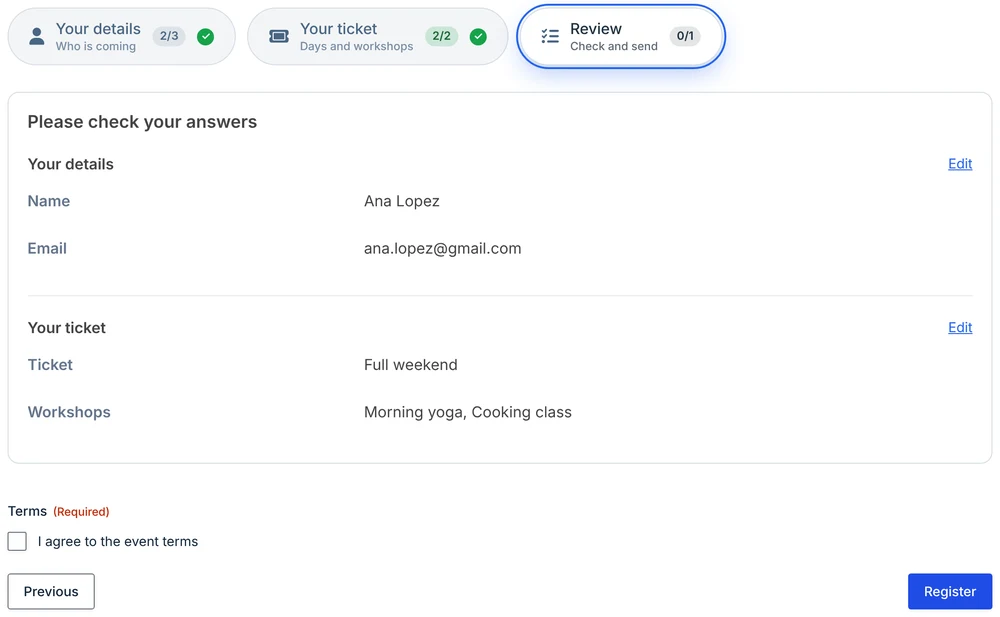
A review step lists the visitor’s answers from the earlier steps so they can check them before submitting. It’s usually the last step.
Add a review step
- Add a Step field where the review should go, usually at the end of the form, and name it, for example Review.
- In its General settings, tick Review step: show a summary of all answers.
- Optionally change Summary heading. Empty uses Please check your answers.
- Optionally add fields below the review Step field, such as a consent checkbox, a signature or payment. They show under the summary.
- Click Save Form.
On the last step, the Step field’s Next button text renames the Submit button, for example to Register or Send application.
What the summary shows
- Every step before the review step, in order, under the step’s name.
- Each answered question with its label and answer. Choices show their text as the visitor saw it; Name and Address parts are joined into one line; uploads show the file names.
- Updated every time the review step opens, so it always matches the form.
Left out: unanswered questions, fields hidden by conditional logic, steps hidden by conditional logic, fields that ask nothing (HTML, Section, Hidden, CAPTCHA), and anything secret: passwords and card or payment details are never shown. A step with no answers to show is left out entirely.
Edit links
- Each step’s heading has an Edit link that opens that step.
- Each answer has its own Edit link that opens the step and puts the cursor in that field. It appears when you point at or tab to the answer, and always on screens narrower than 600 pixels.
- After an Edit link, the Next button reads Back to review and goes straight back to the review step. Everything is checked again when the form is submitted.
Edit links work in In order mode too, because every earlier step has been done by the time the visitor reaches the review.
Was this page helpful?
Thanks for letting us know.